> For the complete documentation index, see [llms.txt](https://docs.fibricheck.com/introduction/llms.txt). Markdown versions of documentation pages are available by appending `.md` to page URLs; this page is available as [Markdown](https://docs.fibricheck.com/introduction/connect-api/fibricheck-connect-api.md).
# FibriCheck Connect API
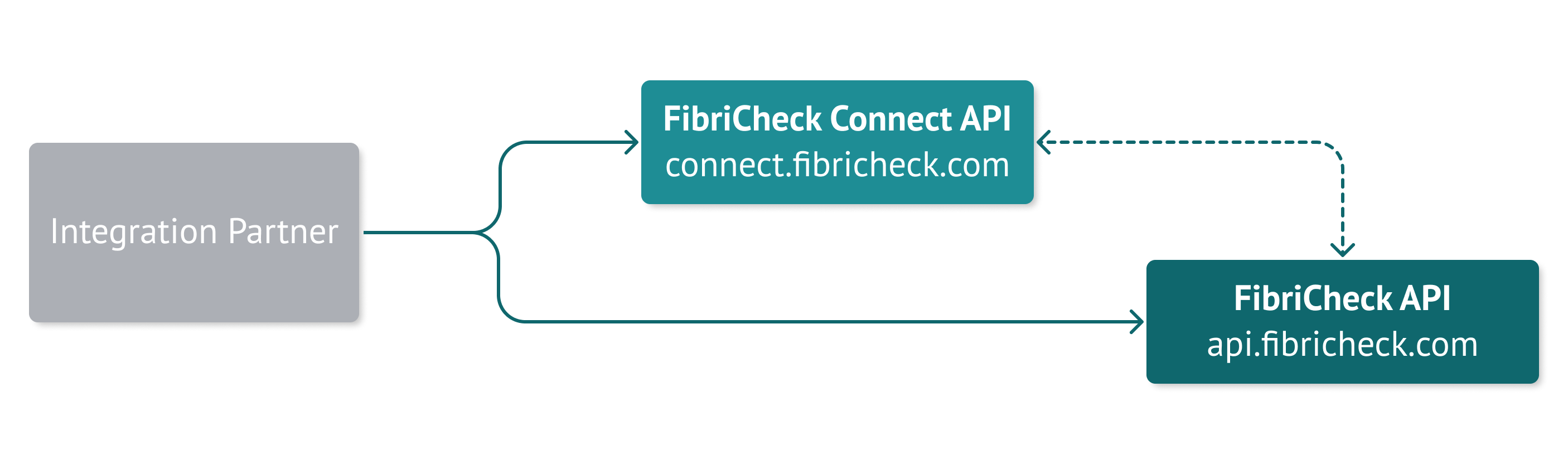
The FibriCheck Connect API is a set of new API endpoints dedicated to facilitating integrations via partner platforms, intermediate integration platforms, and electronic health records (EHRs).
Currently, the FibriCheck Connect API does not yet fully replace the regular FibriCheck API. We will be gradually increasing the functionality of the Connect API so that as an integration partner, you'll become less dependent on the FibriCheck API.
The current feature set of the Connect API is:
* Facilitate integrations through the [Transmural Platform \[TMP\] ](https://www.telemonitoring-prescription.com/)in Belgium.
* Facilitate integrations with EPIC through Smart on FHIR.
* Provide an easy way to generate user-specific portal links.
## Authenticating against the Connect API
{% hint style="warning" %}
Access to the Connect API is disabled by default for our integration partners. If you want to have access, please reach out to your FibriCheck or contact us at
{% endhint %}
The Connect API supports the same authentication as the regular API. That means that if you're authenticated against the regular API, you're also authenticated against the Connect API.
The Connect API supports both the **OAuth1.0** and **OAuth2.0** authentication methods from the regular API.
The most important difference to keep in mind is that the hostnames are different.
Development
🇪🇺 EU Production
🇺🇸 US Production
Host
connect.dev.fibricheck.com
connect.fibricheck.com
connect.us.fibricheck.com
## Generating a portal patient web view URL
In integrations, it's often required to show a patient-scoped view of FibriCheck in an external platform. To avoid having to rebuild all the FibriCheck functionalities, we offer a way to easily generate an authenticated URL that opens a patient-scoped view of the FibriCheck Portal.
{% embed url="" %}
### API Specification
Example call:
```json
GET https://connect.dev.fibricheck.com/api/v1/integrations/integrationPartner/1234567890abcdef12345678/patient_link?userId=5811c91b46e0fb000530a46d
```
## Get patient link
> Get a link to the patient dashboard to review patient measurements.
```json
{"openapi":"3.0.0","info":{"title":"Fibricheck Connect API","version":"0.1.0"},"tags":[{"name":"Customers","description":"Endpoints related to customer management"}],"servers":[{"url":"https://connect.dev.fibricheck.com","description":"Development server"}],"paths":{"/api/v1/integrations/{integrationPartner}/{customerId}/patient_link":{"get":{"summary":"Get patient link","tags":["Customers"],"description":"Get a link to the patient dashboard to review patient measurements.","parameters":[{"schema":{"type":"string"},"in":"query","name":"userId","required":false,"description":"The patient user ID at FibriCheck for which you want to show the measurements."},{"schema":{"type":"string"},"in":"path","name":"integrationPartner","required":true},{"schema":{"type":"string"},"in":"path","name":"customerId","required":true,"description":"customer ID for which to query"}],"responses":{"200":{"description":"Default Response","content":{"application/json":{"schema":{"type":"object","properties":{"url":{"format":"uri","type":"string"}},"required":["url"]}}}},"400":{"description":"Default Response","content":{"application/json":{"schema":{"type":"string"}}}}}}}}}
```